0 ratings

Item #:
4768242
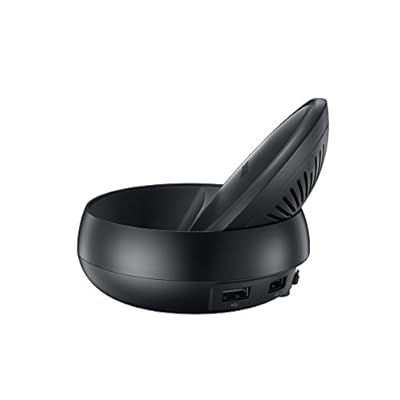
Samsung DeX Station, Desktop Experience for Galaxy S8 S8 MG950 International Version
Item #:
4768242
KGS 356063000
Price Details
Excluding Shipping & Custom charges ( Shipping and custom charges will be calculated on checkout )
*All items will import from US
0 ratings
Write a review
Out of stock
 Imported from USA store
Secured transaction
Ubuy works hard to protect your security and privacy. Our advanced payment security system ensures confidentiality by encrypting your information during transmission using AES (Advanced Encryption Standards) and SSL (Secure Socket Layer) protocols. Your payment details are 100% secure as we do not share your payment details with third party sellers.
Our Top Logistics Partners


Fast
Shipping

Free
Return*

Secure Packaging

100% Original Products

PCI DSS Compliance

ISO 27001 Certified


Note: Step Down Voltage Transformer required for using electronics products of US store (110-120). Recommended power converters Buy Now.


What Stands Out
Seamless Connectivity
Easily transform your Galaxy S8/S8+ into a desktop environment with Samsung DeX. Experience a full desktop interface while connecting peripherals for enhanced productivity on the go.
Versatile Compatibility
Samsung DeX Station supports multiple devices and connectivity options, allowing users to connect monitors, keyboards, and mice for an optimized work experience across various platforms.
Enhanced Productivity
Utilize the power of your smartphone with desktop applications and multitasking capabilities, boosting efficiency and making Samsung DeX an essential tool for professionals and creative users.
Product Details
| Hardware Interface | USB Type C |
| Compatible Devices | Smartphones |
| Total Usb Ports | 2 |
| Number of Ports | 2 |
| Total Number of HDMI Ports | 1 |
| Input Voltage | 240 Volts |
| Item Weight | 1 Pounds (450 grams) |
| Brand | Samsung |
| Manufacturer | UnAssigned |
| Model Number | S8+ MG950 |
| Mfr Part Number | S8+ MG950 |
| Total USB Ports | 2 |
| Total HDMI Ports | 1 |
Who Should Buy?

-
Mobile Professionals
Ideal for users who frequently travel and need a portable desktop experience for work on their Galaxy device.
-
Students
Perfect for students looking for a budget-friendly desktop solution to manage assignments and research on their smartphones.
-
Casual Gamers
Great for casual gamers who want to enjoy mobile games on a larger screen with a more comfortable setup.

-
Heavy Gamers
Not suitable for gamers needing high-performance graphics, as it may not support resource-intensive games effectively.
-
Non-Galaxy Users
Users with phones other than Galaxy S8 or S8+ will not be able to utilize the DeX Station features.
-
Advanced Developers
Limited capability for developers requiring specialized tools, environments, or applications beyond what the DeX platform provides.
Product Description
Samsung DeX Station, Desktop Experience for Galaxy S8 S8 MG950 International Version
Have any Query? Chat with us
Customer Questions & Answers
-
Question:
What is the Samsung DeX Station and how does it work?
Answer: The Samsung DeX Station enables you to use your Galaxy S8 or S8+ like a desktop computer by connecting it to a monitor, keyboard, and mouse. Simply dock your phone into the DeX Station, which then uses the phone's processing power to drive a desktop-like interface. You can access applications, multitask, and view documents easily, making it perfect for productivity on the go or for a clutter-free workspace. -
Question:
Can I use the Samsung DeX Station with other Samsung devices?
Answer: While primarily designed for the Galaxy S8 and S8+, the Samsung DeX Station is compatible with other Galaxy devices that support DeX, such as Galaxy Note series and newer Galaxy S models. This versatility means you can easily switch devices without needing an additional docking station. It's an ideal solution for those who often use different Samsung devices for work or entertainment. -
Question:
What ports and connectivity options does the DeX Station offer?
Answer: The Samsung DeX Station is equipped with essential ports including HDMI for connecting to a monitor, USB ports for peripherals, and ethernet for stable internet connectivity. This allows you to not only display your content but also connect external devices such as a keyboard and mouse, enhancing your overall user experience. It's perfect for setting up a mini office or entertainment center at home. -
Question:
Does the DeX Station support external displays with high resolutions?
Answer: Yes, the Samsung DeX Station supports up to 4K resolution on external displays, ensuring that visuals are sharp and vibrant. This capability enhances tasks such as graphic design, video editing, or streaming high-definition content. It's particularly advantageous for professionals who need precise detail in their work or for anyone who enjoys a cinematic experience. -
Question:
Is it possible to charge my phone while using the DeX Station?
Answer: Absolutely, the DeX Station is designed to charge your Galaxy S8 or S8+ while it is docked. This seamless integration ensures that you won't run out of battery during usage, making it perfect for extended work sessions or lengthy video calls. It's especially useful in busy environments where you can't afford downtime. -
Question:
Can I run mobile applications on the DeX Station?
Answer: Yes, while using the DeX Station, you can run mobile applications optimized for the desktop experience. Many popular apps have enhanced features for this interface, allowing better multitasking. This is particularly useful for productivity tasks like document editing or communication apps, transforming your mobile experience into a more efficient desktop setup. -
Question:
How does the DeX Station enhance my productivity?
Answer: By integrating the power of your Galaxy S8 into a desktop-like environment, the DeX Station allows you to manage multiple tasks seamlessly. Dual monitor support, full-sized keyboard functionality, and the ability to organize windows improve efficiency for tasks like email, document editing, and video conferencing. It's ideal for professionals who benefit from a consolidated workspace. -
Question:
Are there any applications specifically optimized for Samsung DeX?
Answer: Yes, there are numerous applications optimized for Samsung DeX, including Microsoft Office suite, Adobe's creative apps, and various productivity tools. These applications are designed to take advantage of the larger screen and desktop-like interface, offering functionalities that enhance productivity. This is particularly beneficial for users who rely on professional-grade software for their day-to-day tasks. -
Question:
Can I use Bluetooth accessories with the DeX Station?
Answer: Yes, Bluetooth accessories such as keyboards, mice, and headsets can be paired with your Galaxy S8 while using the DeX Station. This provides a wire-free experience, enhancing convenience and flexibility. It's particularly useful when you want to create a clean, clutter-free workspace or when using the DeX Station in a more casual setup. -
Question:
Where can I buy Samsung DeX Station, Desktop Experience for Galaxy S8 S8 MG950 International Version?
Answer: You can buy the Samsung DeX Station, Desktop Experience for Galaxy S8 S8 MG950 International Version at Ubuy in Kyrgyzstan. Ubuy is a reputable online platform that offers a wide range of electronics, ensuring you get authentic products with a streamlined shopping experience.
Samsung Basic Cases S8+ MG950 Editorial Review
The Dex Station is a handy accessory for Samsung users looking to transform their smartphone into a desktop-like experience. Users can easily connect their Note 8 to the station, providing a PC-like interface for more productivity. While it may be slightly cumbersome to use with a phone case on, a USB Type-C connection cable can be used as an alternative. The station charges the phone while in use and is compatible with 4K monitors, although the display is limited to 1080p.
Customer Reviews & Ratings
1 customers ratings
-
5 Star
100%
-
4 Star
0%
-
3 Star
0%
-
2 Star
0%
-
1 Star
0%
Review this product
Share your thoughts with other customers
Pros
- Turns phone into a desktop-like experience
- Charges the phone while in use
- Compatible with 4K monitors (display is limited to 1080p)
Cons
- Software design could be improved
Product Price History
Important information
- Limitations : For products shipped internationally, please note that any manufacturer warranty may not be valid; manufacturer service options may not be available; product manuals, instructions, and safety warnings may not be in destination country languages; the products (and accompanying materials) may not be designed in accordance with destination country standards, specifications, and labeling requirements; and the products may not conform to destination country voltage and other electrical standards (requiring use of an adapter or converter if appropriate). The recipient is responsible for assuring that the product can be lawfully imported to the destination country. When ordering from Ubuy or its affiliates, the recipient is the importer of record and must comply with all laws and regulations of the destination country.
- Not all the products listed on Ubuy are for sale, as Ubuy is a global search engine. Products are subject to export/trade regulations.
KGS 356063000
Currently unavailable.
We don't know when or if this item will be back in stock.
This item is not restrict in my country.(Please click on above link if this item is not restrict in your country, So our team will review and allow.)
Secured transaction
Ubuy works hard to protect your security and privacy. Our advanced payment security system ensures confidentiality by encrypting your information during transmission using AES (Advanced Encryption Standards) and SSL (Secure Socket Layer) protocols. Your payment details are 100% secure as we do not share your payment details with third party sellers.
Our Top Logistics Partners
Fastest cross-border delivery