- Home Page /
- Electronics /
- Computer Accessories /
- Computer Components /
- Single Board Computers /
- DFRobot DFRobot LCD Shield for Arduino
0 ratings

Item #:
86330955
DFRobot DFRobot LCD Shield for Arduino
Item #:
86330955
KGS 2260
Price Details
Excluding Shipping & Custom charges ( Shipping and custom charges will be calculated on checkout )
*All items will import from US
0 ratings
Write a review
In stock
 Imported from USA store
QTY:
Order now and get it around Sunday, July 05
Secured transaction
Ubuy works hard to protect your security and privacy. Our advanced payment security system ensures confidentiality by encrypting your information during transmission using AES (Advanced Encryption Standards) and SSL (Secure Socket Layer) protocols. Your payment details are 100% secure as we do not share your payment details with third party sellers.
Our Top Logistics Partners


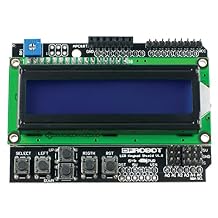
The LCD Shield for Arduino includes a 2x16 character LCD display, six momentary push buttons, contrast adjustment, and back-light on/off functions, making it perfect for monitoring, menu selection, gaming, and quick information display without needing a computer nearby.

Fast
Shipping

Free
Return*

Secure Packaging

100% Original Products

PCI DSS Compliance

ISO 27001 Certified


Note: Step Down Voltage Transformer required for using electronics products of US store (110-120). Recommended power converters Buy Now.


What Stands Out
User-Friendly Display
The DFRobot LCD Shield simplifies project development with its easy-to-read interface, allowing users to display critical information effortlessly, catering to beginners and seasoned developers alike.
Versatile Compatibility
Designed to fit most Arduino boards seamlessly, this shield enhances project connectivity, enabling users to expand capabilities with minimal hassle compared to other displays on the market.
Cost-Effective Solution
Offering high performance at an affordable price, the DFRobot LCD Shield provides excellent value for hobbyists and educators, ensuring quality functionality without breaking the bank.
Product Details
| Item Weight | 0.2 lbs (90 grams) |
Who Should Buy?

-
Beginner Programmers
Ideal for new Arduino users looking to enhance their projects with visual displays easily.
-
Education Purposes
Perfect for educators aiming to teach programming and electronics concepts through interactive display projects.
-
Hobbyist Projects
Great for hobbyists wanting to create DIY electronics projects needing a simple and effective display solution.

-
Advanced Developers
Advanced users may find the shield too basic for complex displays and require more customizable options.
-
Compact Builds
Users needing ultra-compact designs may find the shield's bulkiness unsuitable for space-constrained projects.
-
One-Time Use
Those looking for a disposable solution may not find long-term value in investing in this display shield.
Product Description
DFRobot DFRobot LCD Shield for Arduino
Have any Query? Chat with us
Customer Questions & Answers
-
Question:
What is the DFRobot LCD Shield for Arduino?
Answer: The DFRobot LCD Shield for Arduino is a versatile accessory designed to facilitate the integration of an LCD display with Arduino projects. It features a 16x2 character LCD alongside various control buttons, allowing for easy navigation and interaction with your Arduino applications. This shield simplifies the connection process, reducing wiring complexity and enabling quick prototyping. It’s ideal for projects such as data display, user interfaces, or any scenario requiring visual feedback. -
Question:
How do I connect the DFRobot LCD Shield to my Arduino?
Answer: Connecting the DFRobot LCD Shield to an Arduino is straightforward. Align the pins of the shield with the corresponding holes on the Arduino and place it firmly on top. The shield is designed with the Arduino Uno in mind, ensuring seamless compatibility. Additionally, it typically includes header pins that correspond with typical Arduino libraries, providing an effortless way to leverage existing code. This setup is especially useful for beginners who want to dive into robotics and display projects without complex wiring. -
Question:
What programming libraries are compatible with the DFRobot LCD Shield?
Answer: The DFRobot LCD Shield is compatible with popular Arduino libraries such as LiquidCrystal and custom libraries provided by DFRobot. These libraries provide pre-built functions that simplify the process of displaying text and controlling the shield, allowing users to focus on their project rather than low-level coding. This compatibility is essential for developers looking to create interactive applications like user interfaces in robotics or real-time data displays in science experiments. -
Question:
Can I use the DFRobot LCD Shield with other Arduino models?
Answer: While the DFRobot LCD Shield is primarily designed for the Arduino Uno, it can also be used with other Arduino models that share a similar pin configuration, such as the Mega. However, modifications in the code may be necessary to accommodate different pin mappings. This flexibility allows hobbyists and professionals to adapt the shield for various projects, enhancing the potential applications in home automation, educational tools, or even art installations. -
Question:
What kind of projects can I create with the DFRobot LCD Shield?
Answer: The DFRobot LCD Shield is suitable for a wide range of projects, including but not limited to, weather stations displaying temperature and humidity, digital clocks, and interactive kiosks. Its display capabilities allow for real-time data visualization and user interaction through buttons. These features make it a go-to solution for DIY enthusiasts looking to create visual feedback systems, improving user experience and overall functionality in their projects. -
Question:
Does the DFRobot LCD Shield support backlighting?
Answer: Yes, the DFRobot LCD Shield typically comes equipped with a backlight feature, enhancing visibility in various lighting conditions. Users can easily toggle the backlight on and off through code commands. This aspect is particularly beneficial for projects that are intended for outdoor use or low-light environments where readability is crucial. As a result, it expands the scope of applications, allowing for effective communication of information at all times. -
Question:
Is the DFRobot LCD Shield easy to prototype with?
Answer: Absolutely! The DFRobot LCD Shield is designed for fast prototyping, thanks to its plug-and-play design and compatibility with the Arduino ecosystem. Beginners can quickly get started without deep technical knowledge, while experienced developers can use it to expedite project development. This makes it an ideal choice for educational settings, hackathons, or any situation where rapid iteration and testing of ideas are essential. -
Question:
Are there additional accessories I should use with the DFRobot LCD Shield?
Answer: Accompanying the DFRobot LCD Shield with additional components like sensors (temperature, humidity, etc.) and communication modules (Wi-Fi, Bluetooth) can significantly enhance your project’s functionality. For instance, you can display sensor readings in real-time or create a remote monitoring system. Integrating these sensors allows for creating complex systems, from home automation gadgets to environmental monitoring tools, demonstrating the versatility of the LCD Shield. -
Question:
What troubleshooting steps should I take if the LCD Shield does not display anything?
Answer: If the LCD Shield fails to display anything, first ensure that it is correctly seated on the Arduino with all pins aligned. Check your code for the correct initialization of the display library and confirm that your Arduino is functioning correctly. If the display is blank, it may be due to backlight settings or contrast adjustments, so reviewing these parameters in your code is essential. Troubleshooting these areas can help resolve common display issues. -
Question:
Where can I buy DFRobot DFRobot LCD Shield for Arduino?
Answer: You can buy the DFRobot LCD Shield for Arduino on Ubuy, which offers a reliable platform for locating this product in Kyrgyzstan. Featuring various options, Ubuy allows you to check out product specifications, customer reviews, and more, ensuring a top shopping experience tailored to your needs.
DFROBOT Single Board Computers Editorial Review
No editorial reviews found
Customer Reviews & Ratings
1 customers ratings
-
5 Star
0%
-
4 Star
100%
-
3 Star
0%
-
2 Star
0%
-
1 Star
0%
Review this product
Share your thoughts with other customers
Product Price History
Important information
- Limitations : For products shipped internationally, please note that any manufacturer warranty may not be valid; manufacturer service options may not be available; product manuals, instructions, and safety warnings may not be in destination country languages; the products (and accompanying materials) may not be designed in accordance with destination country standards, specifications, and labeling requirements; and the products may not conform to destination country voltage and other electrical standards (requiring use of an adapter or converter if appropriate). The recipient is responsible for assuring that the product can be lawfully imported to the destination country. When ordering from Ubuy or its affiliates, the recipient is the importer of record and must comply with all laws and regulations of the destination country.
- Not all the products listed on Ubuy are for sale, as Ubuy is a global search engine. Products are subject to export/trade regulations.
KGS 2260
Order now and get it around Sunday, July 05
This item is not restrict in my country.(Please click on above link if this item is not restrict in your country, So our team will review and allow.)
QTY:
Secured transaction
Ubuy works hard to protect your security and privacy. Our advanced payment security system ensures confidentiality by encrypting your information during transmission using AES (Advanced Encryption Standards) and SSL (Secure Socket Layer) protocols. Your payment details are 100% secure as we do not share your payment details with third party sellers.
Our Top Logistics Partners
Fastest cross-border delivery
Features & Benefits
- 2x16 character LCD display with white characters and blue backlight
- Six momentary push buttons for custom menu control panel
- Contrast adjustment, back-light on/off functions, and LED power indicator
- Ideal for monitoring, menu selection, gaming, testing, debugging, and standalone operations
- APC/Bluetooth v3 socket for wireless data transmission, no soldering required, and easy sensor plugging
- Works with Arduino LCD4Bit library and various wireless modules